Backup and point-in-time recovery start with a topology decision
Majority on three nodes is two. Snapshot a voting member and your backup window is a race between the snapshot and the next fault. Fix: a fourth member — hidden, zero votes, zero priority. It takes every write and influences nothing, so it can be blocked and quiesced for free. Everything follows from that: quiesced snapshots, a 16GB oplog where voters have 3.2GB, oplog capture on the data disk, and a drill that recovers 12 transactions to the second before a deleteMany.

Majority on a three-node replica set is two. That number is the entire durability argument, and it holds only while two nodes are healthy and answering.
Now attach a backup to one of them.
A clean snapshot needs the disk quiet. Quiet means blocking writes. Blocking writes on a voting member means it stops acknowledging, and for the duration of the backup window majority is a race between the snapshot and the next fault. There is no slack on three nodes: one member busy is one fault from losing quorum. The backup schedule has become an availability dependency, and the bet gets placed at 03:00 by a cron job nobody is watching.
The usual response is to snapshot a secondary anyway, because the window is short and the odds are good.
The alternative is to stop treating backup as something bolted onto the replication topology, and start treating it as a topology decision of its own.
Replication and backup answer different questions#
The three-node layout across UAE North, South Africa North and West Europe answers one question: how do we survive losing a region without losing acknowledged writes? Geographic spread plus majority acknowledgement. Every member is load-bearing.
Backup answers a different question: how do we recover from something replication propagated faithfully to every copy? A migration with a bad filter. A deleteMany missing its predicate. An application writing valid-looking garbage for three weeks. Replication is not a defence against any of it — it is the delivery mechanism. Three copies of corrupted data are three copies of corrupted data.
The requirements diverge from there. Replication wants every member responsive and voting. Backup wants a member that can be blocked, quiesced, read to exhaustion, and taken offline without anyone noticing.
On the same node those requirements fight. On different nodes they do not.
The fourth member is invisible to the durability math#
The node is a Standard_B2s in West Europe on the monitoring subnet, with a dedicated 64 GB Premium SSD for dbPath. The build is the same ground Parts 2 and 4 covered — Ubuntu 22.04, THP disabled, swappiness at 1, XFS on the data disk with a nofail fstab entry so a missing disk never blocks boot:
echo 'UUID=<uuid> /var/lib/mongodb xfs defaults,nofail 0 2' | sudo tee -a /etc/fstabFour things are specific to this node and worth the space.
The version is pinned to match the cluster exactly. A backup node is the one member where patch drift is not a cosmetic concern: it produces the snapshot you will restore, and a restore target running a different build than the data that wrote it is a variable you discover during an incident.
sudo apt-get install -y --allow-downgrades \
mongodb-org=8.2.9 \
mongodb-org-database=8.2.9 \
mongodb-org-server=8.2.9 \
mongodb-org-mongos=8.2.9 \
mongodb-org-tools=8.2.9 \
mongodb-org-database-tools-extra=8.2.9
echo "mongodb-org hold
mongodb-org-database hold
mongodb-org-server hold
mongodb-org-mongos hold
mongodb-org-tools hold
mongodb-org-database-tools-extra hold" | sudo dpkg --set-selections
sudo apt-mark showholdThe hold matters more than the install. Without it, an unattended apt upgrade during routine patching walks this node ahead of the cluster, and nothing complains until the restore.
The certificate carries the same OU as every other member. A per-node SAN block on the intermediate CA:
[ v3_member_backup ]
subjectKeyIdentifier = hash
authorityKeyIdentifier = keyid,issuer
basicConstraints = critical, CA:false
keyUsage = critical, digitalSignature, keyEncipherment
extendedKeyUsage = serverAuth, clientAuth
subjectAltName = DNS:node-backup.mongo.internal, IP:10.3.2.5Key and CSR generated on the node — the private key never travels — then the CSR goes to the CA host and is signed:
# On the backup node
openssl genrsa -aes256 -out /tmp/node-backup.key.pem 4096
openssl req -new -key /tmp/node-backup.key.pem \
-out /tmp/node-backup.csr.pem \
-subj "/O=Meetadev/OU=cluster-members/CN=node-backup.mongo.internal/DC=internal/DC=mongo"
# scp the CSR to the CA host, then there:
openssl ca \
-config /etc/pki/meetadev-mongo-ca/openssl.cnf \
-extensions v3_member_backup \
-days 365 -notext -md sha256 \
-in /etc/pki/meetadev-mongo-ca/csr/node-backup.csr.pem \
-out /etc/pki/meetadev-mongo-ca/certs/node-backup.cert.pemThe subject matters more than it looks: policy_strict enforces matching O and DC across all member certificates, and mongod matches OU=cluster-members for membership authentication. Get either wrong and the node authenticates as a client rather than a peer, which fails in a way the logs describe unhelpfully.
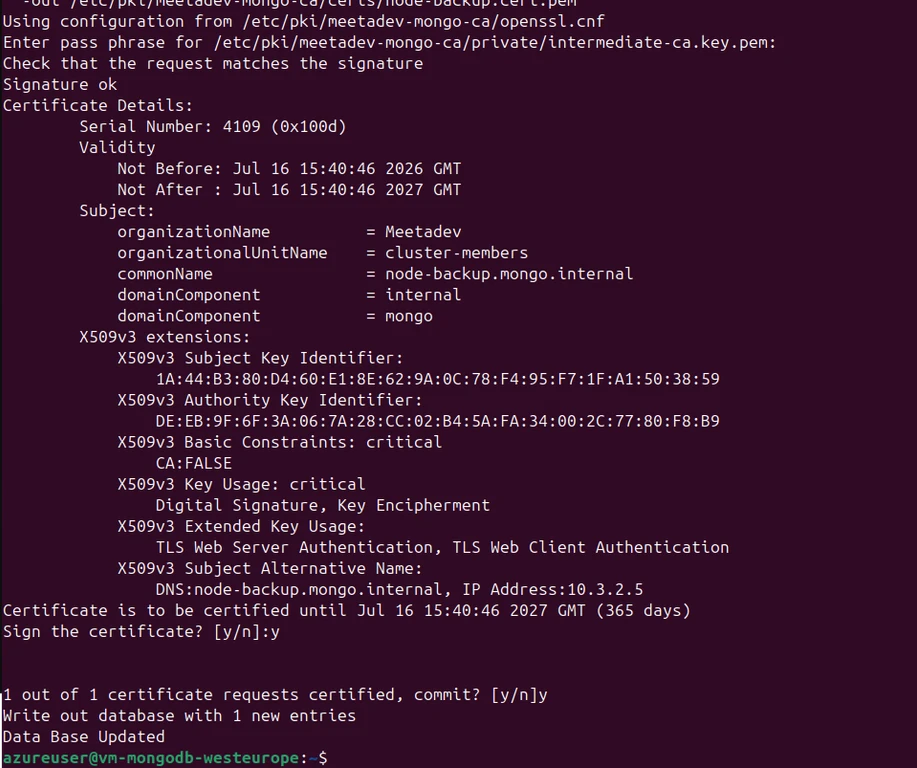

The config reads its passphrase from a file, and that has a condition. mongod.conf mirrors the other members exactly:
net:
tls:
mode: requireTLS
certificateKeyFile: /etc/mongodb/tls/node-backup.combined.pem
certificateKeyFilePassword:
__exec: 'cat /etc/mongodb/tls/private/backup.passphrase'
type: 'string'
trim: 'whitespace'
CAFile: /etc/mongodb/tls/ca-chain.cert.pem
allowConnectionsWithoutCertificates: false
disabledProtocols: TLS1_0,TLS1_1
security:
authorization: enabled
clusterAuthMode: x509
replication:
replSetName: rs0__exec expansion is off by default. The flag goes in a systemd drop-in alongside the process hardening:
# /etc/systemd/system/mongod.service.d/hardening.conf
[Service]
ExecStart=
ExecStart=/usr/bin/mongod --config /etc/mongod.conf --configExpand=exec
ProtectSystem=strict
ReadWritePaths=/var/lib/mongodb /var/log/mongodb
ProtectHome=true
PrivateTmp=true
NoNewPrivileges=trueAnd --configExpand=exec refuses to start unless the config file is owned by, and exclusively writable by, the user mongod runs as. A config that can execute commands must not be writable by anyone else:
sudo chown mongodb:mongodb /etc/mongod.conf
sudo chmod 600 /etc/mongod.conf
The network layer is not free. The three data nodes allow 27017 from the three /24 subnets holding the cluster. The backup node lives on 10.3.2.0/24 — the monitoring subnet — which is in none of them. Replication is bidirectional, so four NSGs need work.
Inbound to the backup node:
az network nsg rule create \
--resource-group rg-mongodb-west-europe \
--nsg-name nsg-monitoring \
--name allow-mongodb-replication \
--priority 100 \
--source-address-prefixes 10.1.1.0/24 10.2.1.0/24 10.3.1.0/24 \
--destination-port-ranges 27017 \
--protocol Tcp --access Allow --direction InboundInbound to each data node, adding the monitoring subnet as a source:
for rg_nsg in \
"rg-mongodb-uae-north:nsg-mongodb-uae" \
"rg-mongodb-southafrica-north:nsg-mongodb-southafrica" \
"rg-mongodb-west-europe:nsg-mongodb-westeurope"; do
rg="${rg_nsg%%:*}"; nsg="${rg_nsg##*:}"
az network nsg rule update \
--resource-group "$rg" --nsg-name "$nsg" --name allow-mongodb \
--source-address-prefixes 10.1.1.0/24 10.2.1.0/24 10.3.1.0/24 10.3.2.0/24
donePlus the DNS record in the zone linked to all three VNets:
az network private-dns record-set a add-record \
--resource-group rg-mongodb-uae-north \
--zone-name mongo.internal \
--record-set-name node-backup \
--ipv4-address 10.3.2.5One trap: az vm create attaches a NIC-level NSG by default even when the subnet already has one. Two stacked NSGs means every rule must exist in both, and the second is invisible until traffic mysteriously drops. Remove it and let the subnet NSG govern, matching the other members:
az network nic update --resource-group rg-mongodb-west-europe \
--name vm-mongo-backupVMNic --remove networkSecurityGroup
az network nsg delete --resource-group rg-mongodb-west-europe \
--name vm-mongo-backupNSGs:Verify both directions before touching the replica set — a member added before the path works is a config change to reverse:
nc -zv node-westeurope.mongo.internal 27017 # from the backup node
nc -zv node-backup.mongo.internal 27017 # from a data nodeThe three flags
rs.add({
host: "node-backup.mongo.internal:27017",
priority: 0,
votes: 0,
hidden: true
})Each does specific work:
votes: 0— not counted in elections, not counted toward majority. Majority stays two of three. Blocking this node's writes for a snapshot is structurally incapable of touching the durability math.priority: 0— can never be elected primary. A backup target that wins an election mid-snapshot is an interesting afternoon.hidden: true— absent from driver topology discovery. No application read lands here by accident, so the node's performance profile belongs entirely to backup.
The resulting configuration is the whole argument in one output:
rs.conf().members.map(m => ({host: m.host, priority: m.priority, votes: m.votes, hidden: m.hidden}))[
{ host: 'node-uae.mongo.internal:27017', priority: 2, votes: 1, hidden: false },
{ host: 'node-southafrica.mongo.internal:27017', priority: 1, votes: 1, hidden: false },
{ host: 'node-westeurope.mongo.internal:27017', priority: 0.5, votes: 1, hidden: false },
{ host: 'node-backup.mongo.internal:27017', priority: 0, votes: 0, hidden: true }
]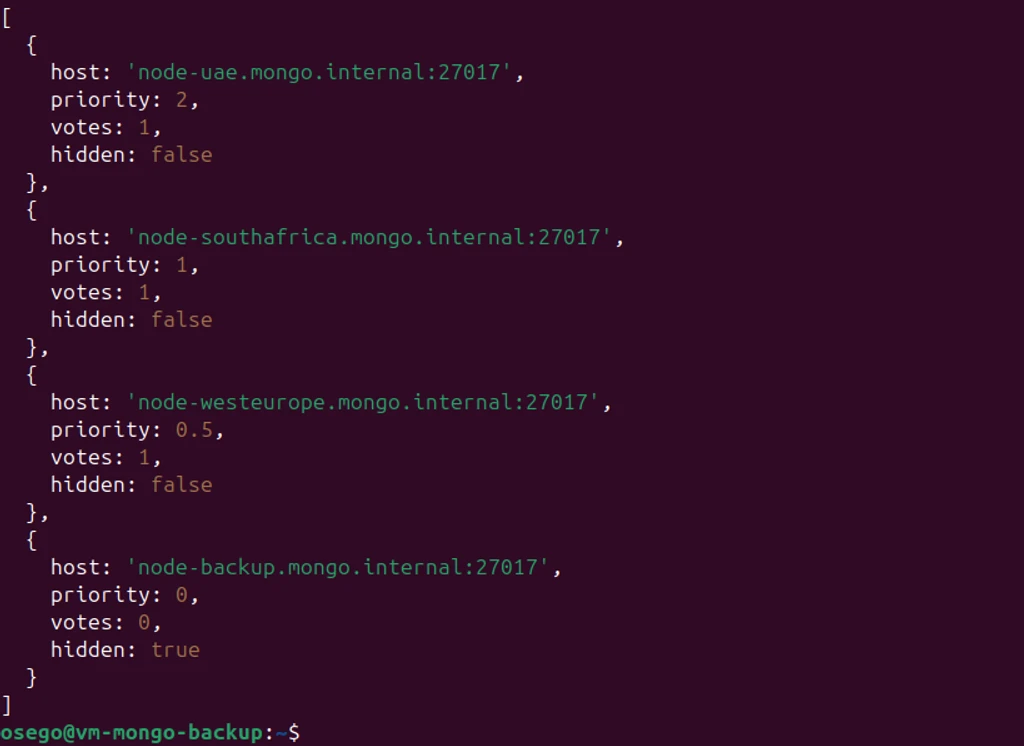
Three voters, untouched. One member that receives every write and influences nothing.
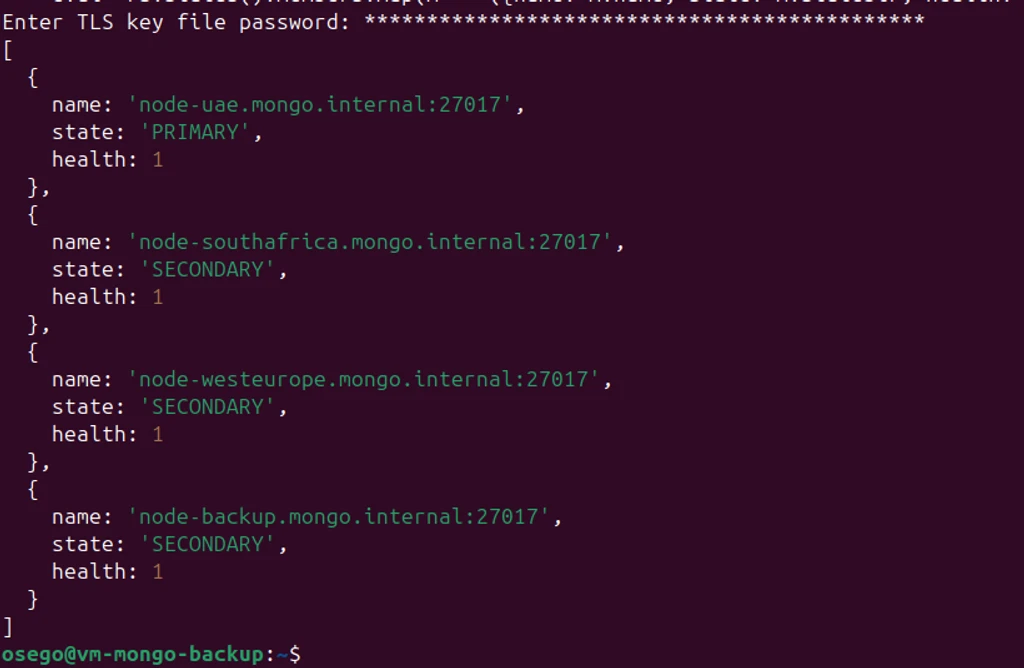
The oplog on this node is sized for recovery, not replication#
The oplog defaults to five percent of free disk — roughly 3.2 GB on the data nodes. That is a replication buffer: enough for a secondary to fall behind and catch up without a resync.
On the backup node it is doing a different job. It is the replay material for point-in-time recovery, and its size is the answer to how far back can we recover to.
db.adminCommand({ replSetResizeOplog: 1, size: 16384 })node-uae: 3235.48 MB
node-backup: 16384 MB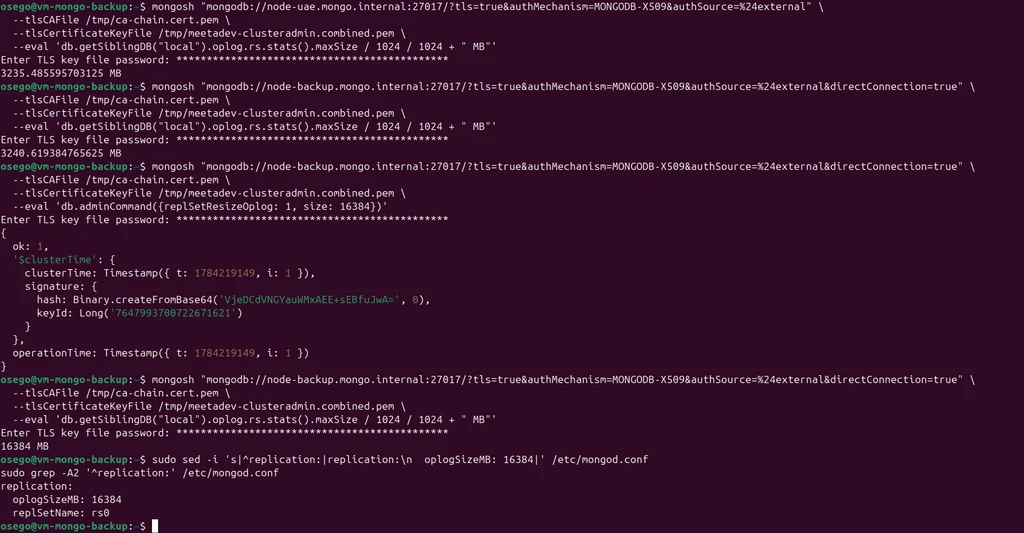
Sixteen gigabytes on one member and 3.2 on the others, in the same replica set, on purpose. Cluster-wide would be a mistake: a larger oplog is more WiredTiger cache pressure on nodes already acknowledging writes across a ~100ms cross-region floor. The voters gain nothing. The backup node needs it and is the one member where nothing competes for the resource.
replSetResizeOplog is runtime-only — the kind of setting that works for six months and reverts silently during an unrelated reboot. It belongs in the config:
replication:
oplogSizeMB: 16384
replSetName: rs0Quiescing is what the topology bought, and the trap is what makes it safe#
An Azure snapshot with no coordination is crash-consistent: the disk as if the machine lost power. WiredTiger recovers from that via its journal. It works. "Works" is a bet that journal replay is clean on a database that was mid-write when the image was taken, and financial-grade systems are not built on usually.
The alternative flushes pending writes and blocks new ones:
db.fsyncLock()
// { info: "now locked against writes...", lockCount: 1, ok: 1 }
// ... snapshot the disk ...
db.fsyncUnlock()
// { info: "fsyncUnlock completed", lockCount: 0, ok: 1 }
Fourteen seconds locked. The node fell fourteen seconds behind and caught up on release.
This is only affordable because the node is hidden and non-voting. On a voting secondary those fourteen seconds are fourteen seconds of degraded majority. Here they are fourteen seconds of a member nobody counts falling behind and catching up. Build the dedicated node and then take the crash-consistent shortcut anyway, and you have paid for a capability you declined to use.
Which leads directly to the thing that makes the mechanism dangerous.
The script locks the node. The snapshot call hangs, or the identity's token expired, or someone typed the wrong resource group. The script dies. The node stays locked.
Nothing alerts. It is up, healthy, answering heartbeats — and blocked against writes, drifting further behind with every minute. It gets discovered in an hour, or a week, or during the restore that needed it.
So the unlock is not a step in the sequence. It is an EXIT trap registered before the lock is taken, guarded by a flag so it is a no-op if the lock never happened. It fires on every path out: success, failure, timeout, SIGTERM. And it loops, because fsyncUnlock decrements one lock level per call — a run that died between two locks leaves a count of two, and a single unlock on the next run leaves the node locked while reporting success.
The preflight is the other half of the same idea. A node in RECOVERING or STARTUP2 is not replicating; snapshotting it produces an artifact that looks exactly like a backup, sits in the retention list looking reassuring, and is worthless. A missing snapshot fires an alert. A bad one does not.
The prune is tag-scoped — createdBy == 'mongo-snapshot.sh' — so it cannot delete snapshots it did not create. A retention job matching on name pattern is a retention job that eventually deletes something else.
#!/usr/bin/env bash
#
# mongo-snapshot.sh — quiesced Azure disk snapshot of the hidden backup member.
#
# Sequence: fsyncLock -> az snapshot create -> fsyncUnlock -> prune old snapshots.
# The unlock is registered as an EXIT trap before the lock is taken, so the node
# is released on every exit path: success, snapshot failure, timeout, or SIGTERM.
# A node left locked is a node silently falling behind the cluster.
set -euo pipefail
# ---- configuration ----------------------------------------------------------
readonly SUBSCRIPTION="<subscription-id>"
readonly SOURCE_DISK="/subscriptions/${SUBSCRIPTION}/resourceGroups/rg-mongodb-west-europe/providers/Microsoft.Compute/disks/disk-mongo-backup-data"
readonly SNAPSHOT_RG="rg-mongodb-backups"
readonly LOCATION="westeurope"
readonly SNAPSHOT_SKU="Standard_ZRS"
readonly RETENTION_DAYS=30
readonly MONGO_HOST="node-backup.mongo.internal:27017"
readonly TLS_CA="/etc/mongodb/tls/ca-chain.cert.pem"
readonly TLS_CERT="/etc/mongodb/tls/clients/meetadev-backup.combined.pem"
readonly ALERTMANAGER="http://monitor.mongo.internal:9093/api/v2/alerts"
readonly LOG_TAG="mongo-snapshot"
# ---- helpers ----------------------------------------------------------------
log() {
logger -t "${LOG_TAG}" -- "$*"
echo "$(date -u +%Y-%m-%dT%H:%M:%SZ) $*"
}
# Best-effort: if Alertmanager is unreachable we still want the script's own
# exit status to carry the failure, so this never aborts the script.
alert() {
local summary="$1"
local description="$2"
local severity="${3:-critical}"
curl -sS --max-time 10 -X POST "${ALERTMANAGER}" \
-H 'Content-Type: application/json' \
-d "[{
\"labels\": {
\"alertname\": \"MongoBackupFailed\",
\"severity\": \"${severity}\",
\"region\": \"westeurope\",
\"instance\": \"node-backup.mongo.internal\",
\"job\": \"mongo-snapshot\"
},
\"annotations\": {
\"summary\": \"${summary}\",
\"description\": \"${description}\"
}
}]" >/dev/null 2>&1 || log "WARN alertmanager unreachable, alert not delivered"
}
mongo_eval() {
mongosh "mongodb://${MONGO_HOST}/?tls=true&authMechanism=MONGODB-X509&authSource=%24external&directConnection=true" \
--tlsCAFile "${TLS_CA}" \
--tlsCertificateKeyFile "${TLS_CERT}" \
--quiet \
--eval "$1"
}
# ---- unlock trap ------------------------------------------------------------
LOCKED=0
unlock() {
if [[ "${LOCKED}" -eq 1 ]]; then
log "releasing fsync lock"
local attempts=0
while [[ "${attempts}" -lt 10 ]]; do
local remaining
remaining=$(mongo_eval 'JSON.stringify(db.fsyncUnlock().lockCount)' 2>/dev/null || echo "ERR")
if [[ "${remaining}" == "ERR" ]]; then
log "ERROR fsyncUnlock call failed"
alert "MongoDB backup node may be left locked" \
"fsyncUnlock failed on node-backup.mongo.internal. The node is blocked against writes and is falling behind the cluster. Manual intervention required: run db.fsyncUnlock() until lockCount reaches 0."
return 1
fi
if echo "${remaining}" | grep -q '"low":0\|^0$'; then
log "fsync lock released"
LOCKED=0
return 0
fi
attempts=$((attempts + 1))
done
log "ERROR lock count did not reach zero after 10 unlock attempts"
alert "MongoDB backup node still locked after unlock attempts" \
"fsyncUnlock was called 10 times and lockCount never reached 0. Manual intervention required."
return 1
fi
}
trap unlock EXIT
# ---- preflight --------------------------------------------------------------
log "starting snapshot run"
STATE=$(mongo_eval 'db.hello().secondary ? "SECONDARY" : "NOT_SECONDARY"')
if [[ "${STATE}" != "SECONDARY" ]]; then
log "ERROR node is not in SECONDARY state (got: ${STATE}), refusing to snapshot"
alert "MongoDB backup node not in SECONDARY state" \
"node-backup.mongo.internal reported state ${STATE}. Snapshot skipped — a snapshot of a non-replicating node is not a valid restore point."
exit 1
fi
log "node is SECONDARY, proceeding"
# ---- lock -------------------------------------------------------------------
SNAPSHOT_NAME="snap-mongo-backup-$(date -u +%Y%m%d-%H%M%S)"
log "acquiring fsync lock"
if ! mongo_eval 'db.fsyncLock().ok' | grep -q '1'; then
log "ERROR fsyncLock failed"
alert "MongoDB backup fsyncLock failed" \
"Could not acquire fsync lock on node-backup.mongo.internal. No snapshot was taken."
exit 1
fi
LOCKED=1
log "fsync lock acquired"
# ---- snapshot ---------------------------------------------------------------
log "creating snapshot ${SNAPSHOT_NAME}"
if ! az snapshot create \
--resource-group "${SNAPSHOT_RG}" \
--name "${SNAPSHOT_NAME}" \
--source "${SOURCE_DISK}" \
--location "${LOCATION}" \
--sku "${SNAPSHOT_SKU}" \
--tags "source=node-backup" "replSet=rs0" "createdBy=mongo-snapshot.sh" \
--only-show-errors \
--output none; then
log "ERROR snapshot creation failed"
alert "MongoDB snapshot creation failed" \
"az snapshot create failed for ${SNAPSHOT_NAME}. The node has been unlocked. No new restore point exists for this window."
exit 1
fi
log "snapshot ${SNAPSHOT_NAME} created"
# ---- unlock (explicit, before pruning) --------------------------------------
# Pruning is not worth holding the lock for. Release now rather than at trap.
unlock
# ---- prune ------------------------------------------------------------------
log "pruning snapshots older than ${RETENTION_DAYS} days"
CUTOFF=$(date -u -d "${RETENTION_DAYS} days ago" +%Y-%m-%dT%H:%M:%SZ)
OLD_SNAPSHOTS=$(az snapshot list \
--resource-group "${SNAPSHOT_RG}" \
--query "[?timeCreated < '${CUTOFF}' && tags.createdBy == 'mongo-snapshot.sh'].name" \
--output tsv \
--only-show-errors)
if [[ -z "${OLD_SNAPSHOTS}" ]]; then
log "no snapshots older than ${RETENTION_DAYS} days"
else
while read -r snap; do
[[ -z "${snap}" ]] && continue
log "deleting expired snapshot ${snap}"
az snapshot delete \
--resource-group "${SNAPSHOT_RG}" \
--name "${snap}" \
--only-show-errors \
--output none || log "WARN failed to delete ${snap}"
done <<< "${OLD_SNAPSHOTS}"
fi
log "snapshot run complete: ${SNAPSHOT_NAME}"
# ---- staleness metric -------------------------------------------------------
# Emit the successful-snapshot timestamp for Prometheus. This is what catches
# the quiet failure: a script that never runs sends no failure alert, but this
# gauge stops advancing and the freshness rule fires.
TEXTFILE_DIR="/var/lib/node_exporter/textfile_collector"
if [[ -d "${TEXTFILE_DIR}" ]]; then
TMPFILE=$(mktemp "${TEXTFILE_DIR}/mongo_snapshot.prom.XXXXXX")
cat > "${TMPFILE}" <<METRICS
# HELP mongo_snapshot_last_success_timestamp_seconds Unix timestamp of the last successful snapshot.
# TYPE mongo_snapshot_last_success_timestamp_seconds gauge
mongo_snapshot_last_success_timestamp_seconds $(date +%s)
METRICS
chmod 644 "${TMPFILE}"
mv "${TMPFILE}" "${TEXTFILE_DIR}/mongo_snapshot.prom"
log "staleness metric written"
fi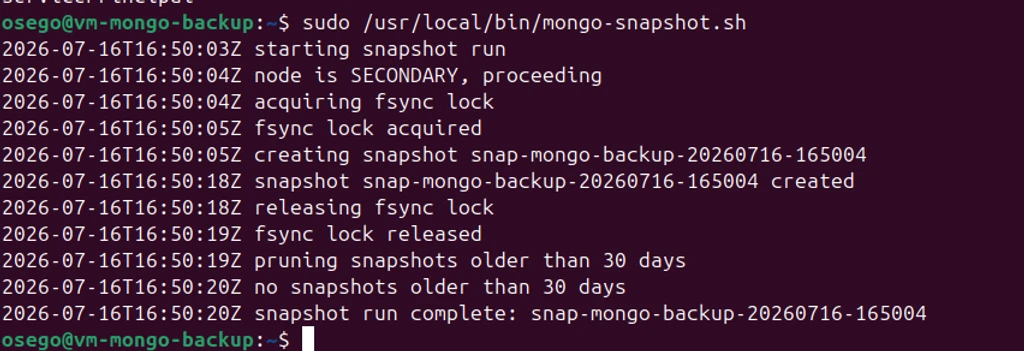
The claim that the node is never left locked is worth nothing until it fails. Point the script at a resource group that does not exist:
17:51:17Z node is SECONDARY, proceeding
17:51:18Z fsync lock acquired
17:51:18Z creating snapshot snap-mongo-backup-20260716-165117
(AuthorizationFailed) The client ... does not have authorization to perform action
'Microsoft.Compute/snapshots/write' over scope '.../rg-does-not-exist/...'
17:51:20Z ERROR snapshot creation failed
17:51:23Z releasing fsync lock
17:51:24Z fsync lock released
EXIT CODE: 1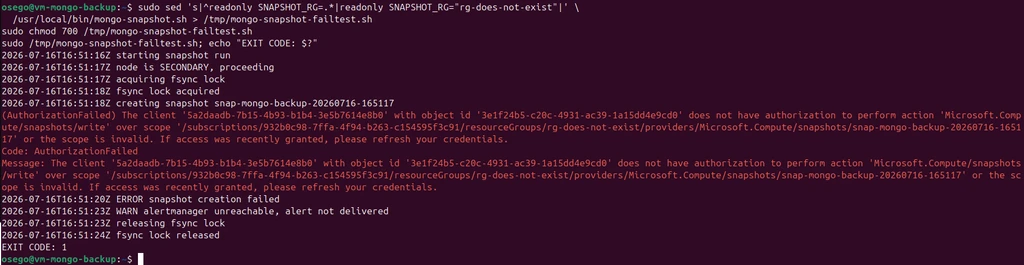
The snapshot failed. The node was released. The exit status carried upward. This output matters more than the successful run, which only proves the easy half.
Scheduling is a systemd timer rather than cron, for Persistent=true — a missed window fires on boot instead of vanishing:
# /etc/systemd/system/mongo-snapshot.service
[Unit]
Description=Quiesced Azure disk snapshot of the hidden MongoDB backup member
After=network-online.target mongod.service
Wants=network-online.target
[Service]
Type=oneshot
ExecStart=/usr/local/bin/mongo-snapshot.sh
User=root
TimeoutStartSec=900
PrivateTmp=true
NoNewPrivileges=true# /etc/systemd/system/mongo-snapshot.timer
[Timer]
OnCalendar=00,06,12,18:00:00
Persistent=true
RandomizedDelaySec=300
[Install]
WantedBy=timers.target
Six hours is not arbitrary. The gap between snapshots is the worst-case oplog replay distance during recovery. Six hours of replay sits comfortably inside a 16 GB oplog even under burst; twenty-four would not, and hourly buys noise rather than safety at this write volume.
Two planes, and only one of them has a clean answer#
The script authenticates twice — to MongoDB to lock the node, to Azure to create the snapshot. Both are places where a backup agent is conventionally handed more than it needs. They are not the same problem.
MongoDB has a clean answer. The built-in backup role covers mongodump-style reads but not fsyncLock. The obvious fix is hostManager, which includes fsync — along with killop, shutdown, logRotate and applicationMessage. Granting a backup agent the ability to shut down the node it is backing up, in order to obtain the ability to flush it, reads fine in a runbook and badly in an incident report.
A custom role instead, with exactly the two actions the agent performs:
db.getSiblingDB("admin").createRole({
role: "meetadevSnapshot",
privileges: [
{ resource: { cluster: true }, actions: ["fsync", "unlock"] }
],
roles: []
})
db.getSiblingDB("$external").grantRolesToUser(
"DC=mongo,DC=internal,CN=meetadev-backup,OU=cluster-clients,O=Meetadev",
[ { role: "meetadevSnapshot", db: "admin" } ]
)The identity does its job, and cannot exceed it:
{ "locked": 1, "unlocked": 1 }
MongoServerError: not authorized on admin to execute command { shutdown: 1, ... }
Azure does not have a clean answer, and the workaround is the interesting part. The snapshot is created by a system-assigned managed identity — no credentials on disk, no service principal secret in a config file, nothing to rotate:
az vm identity assign \
--resource-group rg-mongodb-west-europe \
--name vm-mongo-backupThen scoping it hits a wall. Creating a snapshot requires write at the resource group level, because the snapshot is a new resource in a resource group. Azure cannot scope "create a snapshot" to a single source disk, and no custom role fixes it — unlike MongoDB, the granularity is not there. The standard answer, Disk Snapshot Contributor on the resource group, lets the backup agent snapshot every disk in that group, including the production node's.
So the constraint gets routed around structurally rather than solved: give the snapshots their own resource group, and grant contributor there plus read on exactly one disk.
az group create --name rg-mongodb-backups --location westeurope
az role assignment create \
--assignee <principal-id> \
--role "Contributor" \
--scope /subscriptions/<sub>/resourceGroups/rg-mongodb-backups
az role assignment create \
--assignee <principal-id> \
--role "Disk Snapshot Contributor" \
--scope /subscriptions/<sub>/resourceGroups/rg-mongodb-west-europe/providers/Microsoft.Compute/disks/disk-mongo-backup-dataThis is the hidden-node move one layer down: when you cannot constrain a permission, constrain the blast radius instead. A compromised backup agent cannot delete production disks because it cannot see them.
{ "name": "snap-identity-test", "state": "Succeeded" }
(AuthorizationFailed) The client ... does not have authorization to perform action
'Microsoft.Compute/virtualMachines/read' over scope '.../vm-mongodb-westeurope'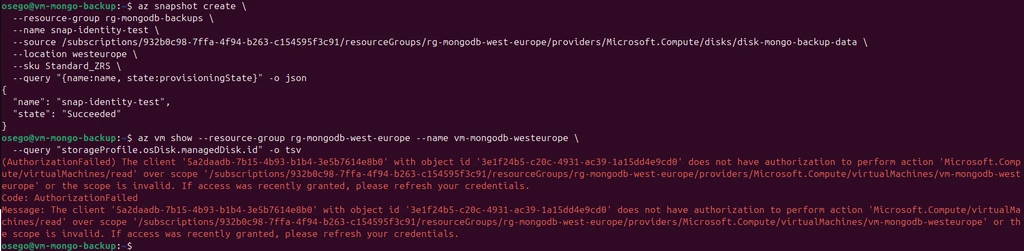
Note that the agent's login on the node is one command, and it carries no secret:
sudo az login --identityThe alert that matters is for the thing that does not happen#
A failed backup fires an alert. That is the easy case and the script handles it.
The hard case is the backup that never runs. Timer disabled during unrelated maintenance. VM deallocated to save cost and never restarted. Script removed by a cleanup. None produce a failure alert, because nothing runs to produce one. The backup does not break; it stops, and the last good restore point recedes while the dashboards stay green.
The metric that catches it is a timestamp written on success and served through the node exporter's textfile collector — which means the backup node needs the exporter, which it should have anyway. The backup node's health is the backup's health, and it joins the same all-mountpoint disk alerting as every other node.
sudo useradd --no-create-home --shell /usr/sbin/nologin node_exporter
sudo mkdir -p /var/lib/node_exporter/textfile_collector
sudo chown -R node_exporter:node_exporter /var/lib/node_exporter# /etc/systemd/system/node_exporter.service
[Service]
User=node_exporter
Group=node_exporter
Type=simple
ExecStart=/usr/local/bin/node_exporter \
--web.listen-address=10.3.2.5:9100 \
--collector.textfile.directory=/var/lib/node_exporter/textfile_collector
Restart=on-failure
RestartSec=5
NoNewPrivileges=true
ProtectHome=true
ProtectSystem=strict
ProtectKernelTunables=true
ProtectKernelModules=true
ProtectControlGroups=trueAdded to Prometheus with a role label so backup-plane rules can select on it:
- job_name: node
static_configs:
- targets: ['10.1.1.4:9100']
labels: { region: uae-north, node: node-uae }
- targets: ['10.2.1.4:9100']
labels: { region: south-africa-north, node: node-southafrica }
- targets: ['10.3.1.4:9100']
labels: { region: west-europe, node: node-westeurope }
- targets: ['10.3.2.5:9100']
labels: { region: west-europe, node: node-backup, role: backup }The script's metric write is atomic — mktemp then mv — so the exporter never scrapes a half-written file.
- alert: MongoSnapshotStale
expr: time() - mongo_snapshot_last_success_timestamp_seconds > 28800
for: 5m
labels:
severity: critical
annotations:
summary: "No successful MongoDB snapshot in over 8 hours"
description: "The last successful snapshot of {{ $labels.node }} was {{ $value | humanizeDuration }} ago. Snapshots are scheduled every 6 hours. A failed run alerts on its own; this fires when no run happened at all — timer disabled, VM deallocated, or script removed. The restore point is aging."
- alert: MongoSnapshotMetricMissing
expr: absent(mongo_snapshot_last_success_timestamp_seconds)
for: 15m
labels:
severity: critical
annotations:
summary: "Snapshot freshness metric has disappeared"
description: "mongo_snapshot_last_success_timestamp_seconds is no longer exported. The staleness alert cannot fire without it, so backup state is unknown rather than known-good."Eight hours against a six-hour schedule: one missed window plus margin, so a single delayed run does not page anyone.
The second rule guards the first. MongoSnapshotStale cannot fire if the metric vanishes — a rule evaluating against nothing stays silent forever, which looks identical to healthy. absent() catches the alert that cannot alert.
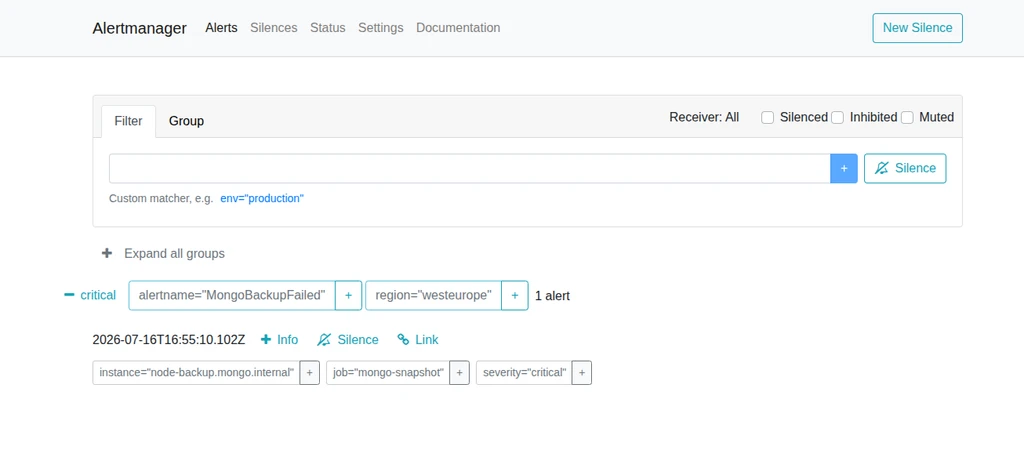
An untested alert rule is a decoration. Backdate the metric by ten hours and watch it move green → pending → firing:
sudo tee /var/lib/node_exporter/textfile_collector/mongo_snapshot.prom > /dev/null <<EOF
# HELP mongo_snapshot_last_success_timestamp_seconds Unix timestamp of the last successful snapshot.
# TYPE mongo_snapshot_last_success_timestamp_seconds gauge
mongo_snapshot_last_success_timestamp_seconds $(($(date +%s) - 36000))
EOF

Snapshots are not recovery, and the archive belongs on the data disk#
Six-hourly snapshots give six-hour granularity. If the bad migration ran at 14:30 and the last snapshot was 12:00, restoring it discards two and a half hours of legitimate transactions along with the damage.
Closing that gap needs the oplog. Replaying it against a restored snapshot rolls data forward from the snapshot's moment to any chosen point — including the second before the damage.
mongodump --oplog does not do this. It captures oplog entries generated during the dump window, to make that dump internally consistent. It says nothing about the hours between backups. This is a common and expensive misunderstanding.
Continuous capture means a periodic incremental dump of entries newer than the last captured timestamp, resuming from a state file. Where the archive lives is the design decision: on the same disk as dbPath.
/var/lib/mongodb/
├── WiredTiger*
├── collection-*.wt
├── index-*.wt
└── oplog-archive/
├── .last-ts
├── 20260716-172302/
├── 20260716-172523/
└── 20260716-175812/Every snapshot then contains both the base data and the oplog needed to roll forward from it. One disk, one restore artifact: mount it and you have everything. The alternative — a separate volume, or blob storage — means a restore needs two artifacts from two systems correlated by timestamp, and the failure mode is a snapshot that restores cleanly and cannot be rolled forward because the matching oplog expired on a different schedule.
A root-owned directory inside mongod's dbPath is unusual. mongod ignores directories it does not recognise, and the coupling is the entire point.

The archiver refuses a non-SECONDARY node for the same reason the snapshot script does, and it checks one thing more: whether its own resume point still exists. The oplog is capped. If the archiver fell behind far enough that the oplog recycled past its resume point, there is a hole — and continuing from the current oldest entry produces an archive that looks continuous and is not. The discovery would happen during a recovery, which is the worst available time. Refusing loudly is the only honest option.
#!/usr/bin/env bash
#
# mongo-oplog-archive.sh — incremental oplog capture from the hidden backup member.
#
# Runs every 5 minutes. Dumps oplog entries newer than the last captured
# timestamp into a BSON archive on the data disk. Because the archive lives on
# the same disk as dbPath, every snapshot is self-contained: it carries both the
# base data and the oplog needed to roll forward from it.
#
# mongodump --oplog only makes a dump internally consistent. It does not give
# point-in-time recovery between backups. This does.
set -euo pipefail
# ---- configuration ----------------------------------------------------------
readonly MONGO_HOST="node-backup.mongo.internal:27017"
readonly TLS_CA="/etc/mongodb/tls/ca-chain.cert.pem"
readonly TLS_CERT="/etc/mongodb/tls/clients/meetadev-backup.combined.pem"
readonly ARCHIVE_DIR="/var/lib/mongodb/oplog-archive"
readonly STATE_FILE="${ARCHIVE_DIR}/.last-ts"
readonly RETENTION_DAYS=30
readonly TEXTFILE_DIR="/var/lib/node_exporter/textfile_collector"
readonly ALERTMANAGER="http://monitor.mongo.internal:9093/api/v2/alerts"
readonly LOG_TAG="mongo-oplog-archive"
readonly MONGO_URI="mongodb://${MONGO_HOST}/?tls=true&authMechanism=MONGODB-X509&authSource=%24external&directConnection=true"
# ---- helpers ----------------------------------------------------------------
log() {
logger -t "${LOG_TAG}" -- "$*"
echo "$(date -u +%Y-%m-%dT%H:%M:%SZ) $*"
}
alert() {
local summary="$1"
local description="$2"
curl -sS --max-time 10 -X POST "${ALERTMANAGER}" \
-H 'Content-Type: application/json' \
-d "[{
\"labels\": {
\"alertname\": \"MongoOplogArchiveFailed\",
\"severity\": \"critical\",
\"region\": \"westeurope\",
\"instance\": \"node-backup.mongo.internal\",
\"job\": \"mongo-oplog-archive\"
},
\"annotations\": {
\"summary\": \"${summary}\",
\"description\": \"${description}\"
}
}]" >/dev/null 2>&1 || log "WARN alertmanager unreachable, alert not delivered"
}
mongo_eval() {
mongosh "${MONGO_URI}" \
--tlsCAFile "${TLS_CA}" \
--tlsCertificateKeyFile "${TLS_CERT}" \
--quiet \
--eval "$1"
}
# ---- preflight --------------------------------------------------------------
mkdir -p "${ARCHIVE_DIR}"
chmod 700 "${ARCHIVE_DIR}"
STATE=$(mongo_eval 'db.hello().secondary ? "SECONDARY" : "NOT_SECONDARY"')
if [[ "${STATE}" != "SECONDARY" ]]; then
log "ERROR node is not SECONDARY (got: ${STATE}), skipping archive run"
alert "Oplog archive skipped: node not SECONDARY" \
"node-backup.mongo.internal reported ${STATE}. Oplog capture skipped. A gap in the archive means point-in-time recovery across this window is not possible."
exit 1
fi
# ---- determine the resume point ---------------------------------------------
# On the first run there is no state file. Start from the oldest entry the
# oplog still holds — that is the earliest point we can honestly claim to cover.
if [[ -f "${STATE_FILE}" ]]; then
LAST_TS=$(cat "${STATE_FILE}")
log "resuming from ts ${LAST_TS}"
else
LAST_TS=$(mongo_eval 'const e = db.getSiblingDB("local").oplog.rs.find().sort({$natural: 1}).limit(1).toArray()[0]; print(e.ts.t + "," + e.ts.i)')
log "no state file, starting from oldest oplog entry: ${LAST_TS}"
fi
TS_SECONDS="${LAST_TS%%,*}"
TS_INC="${LAST_TS##*,}"
# The oplog is capped. If our resume point has been recycled out, there is a
# hole between the last archive and what the oplog still holds. Silently
# archiving from a later point would produce an archive that looks continuous
# and is not.
OLDEST=$(mongo_eval 'const e = db.getSiblingDB("local").oplog.rs.find().sort({$natural: 1}).limit(1).toArray()[0]; print(e.ts.t)')
if [[ "${TS_SECONDS}" -lt "${OLDEST}" ]]; then
log "ERROR resume point ${TS_SECONDS} is older than the oldest oplog entry ${OLDEST}"
alert "Oplog archive gap detected" \
"The archive resume point has been recycled out of the oplog. Entries between the last archive and the current oplog window are permanently lost. Point-in-time recovery across that gap is not possible."
exit 1
fi
# ---- capture ----------------------------------------------------------------
RUN_ID=$(date -u +%Y%m%d-%H%M%S)
OUT_DIR="${ARCHIVE_DIR}/${RUN_ID}"
log "capturing oplog entries after Timestamp(${TS_SECONDS}, ${TS_INC})"
if ! mongodump \
--uri "${MONGO_URI}" \
--ssl \
--sslCAFile "${TLS_CA}" \
--sslPEMKeyFile "${TLS_CERT}" \
--db local \
--collection oplog.rs \
--query "{\"ts\": {\"\$gt\": {\"\$timestamp\": {\"t\": ${TS_SECONDS}, \"i\": ${TS_INC}}}}}" \
--out "${OUT_DIR}" \
--quiet; then
log "ERROR mongodump failed"
rm -rf "${OUT_DIR}"
alert "Oplog archive capture failed" \
"mongodump failed while archiving the oplog. No new oplog entries were captured for this window."
exit 1
fi
BSON="${OUT_DIR}/local/oplog.rs.bson"
if [[ ! -s "${BSON}" ]]; then
# An empty capture is normal on an idle cluster: nothing was written since the
# last run. Discard the empty directory and leave the resume point alone.
log "no new oplog entries since last run"
rm -rf "${OUT_DIR}"
else
ENTRY_COUNT=$(bsondump --quiet "${BSON}" 2>/dev/null | wc -l)
NEWEST=$(bsondump --quiet "${BSON}" 2>/dev/null | tail -1 | python3 -c "
import sys, json
d = json.loads(sys.stdin.read())
print(f\"{d['ts']['\$timestamp']['t']},{d['ts']['\$timestamp']['i']}\")
")
echo "${NEWEST}" > "${STATE_FILE}"
chmod 600 "${STATE_FILE}"
SIZE=$(du -h "${BSON}" | cut -f1)
log "archived ${ENTRY_COUNT} oplog entries (${SIZE}) to ${RUN_ID}, resume point now ${NEWEST}"
fi
# ---- prune ------------------------------------------------------------------
find "${ARCHIVE_DIR}" -maxdepth 1 -type d -name '20*' -mtime "+${RETENTION_DAYS}" -print0 |
while IFS= read -r -d '' old; do
log "pruning expired archive $(basename "${old}")"
rm -rf "${old}"
done
# ---- metrics ----------------------------------------------------------------
if [[ -d "${TEXTFILE_DIR}" ]]; then
ARCHIVE_COUNT=$(find "${ARCHIVE_DIR}" -maxdepth 1 -type d -name '20*' | wc -l)
ARCHIVE_BYTES=$(du -sb "${ARCHIVE_DIR}" | cut -f1)
TMPFILE=$(mktemp "${TEXTFILE_DIR}/mongo_oplog_archive.prom.XXXXXX")
cat > "${TMPFILE}" <<METRICS
# HELP mongo_oplog_archive_last_success_timestamp_seconds Unix timestamp of the last successful oplog archive run.
# TYPE mongo_oplog_archive_last_success_timestamp_seconds gauge
mongo_oplog_archive_last_success_timestamp_seconds $(date +%s)
# HELP mongo_oplog_archive_count Number of oplog archive directories currently retained.
# TYPE mongo_oplog_archive_count gauge
mongo_oplog_archive_count ${ARCHIVE_COUNT}
# HELP mongo_oplog_archive_bytes Total size of the oplog archive on disk.
# TYPE mongo_oplog_archive_bytes gauge
mongo_oplog_archive_bytes ${ARCHIVE_BYTES}
METRICS
chmod 644 "${TMPFILE}"
mv "${TMPFILE}" "${TEXTFILE_DIR}/mongo_oplog_archive.prom"
fi
log "archive run complete"mongo_oplog_archive_bytes exists because this grows on a 64 GB disk shared with dbPath, and the all-mountpoint disk alerting catches it before mongod does.
# /etc/systemd/system/mongo-oplog-archive.service
[Unit]
Description=Incremental oplog capture for point-in-time recovery
After=network-online.target mongod.service
Wants=network-online.target
[Service]
Type=oneshot
ExecStart=/usr/local/bin/mongo-oplog-archive.sh
User=root
TimeoutStartSec=240
NoNewPrivileges=true# /etc/systemd/system/mongo-oplog-archive.timer
[Timer]
OnCalendar=*:0/5
Persistent=true
AccuracySec=30s
[Install]
WantedBy=timers.targetBoth scripts land at /usr/local/bin, root-owned and 700 — they hold no secrets, but they call an identity that can quiesce the cluster's backup member. Then arm everything:
sudo systemctl daemon-reload
sudo systemctl enable --now mongo-snapshot.timer
sudo systemctl enable --now mongo-oplog-archive.timer
sudo systemctl list-timers 'mongo-*' --no-pager
Five minutes is the exposure window. A failure between runs loses at most five minutes of PITR granularity, and the archive is small enough that the cost is a rounding error against a 16 GB oplog.
The drill#
Everything above is machinery. A backup system is real only if a restore works, and a restore counts only if it runs against the artifacts as they actually exist — not against convenient copies.
The scenario:
T0 — snapshot taken. The ledger holds eight transactions.
T1 — four more written. They exist only in the oplog, not in the T0 base.
T2 —
deleteMany({})removes all twelve. This is the incident.
INCIDENT: deleted 12 transactions
remaining: 0
A second snapshot is taken after the incident. Its base data is already destroyed, but its oplog archive spans both the T1 writes and the delete.
So a real recovery uses two snapshots: T0 for the base, T2 for the oplog. Both become disks. Nothing is hand-copied from the live cluster.
az disk create --resource-group rg-mongodb-backups \
--name disk-restore-base \
--source snap-mongo-backup-20260716-175701 \
--location westeurope --sku Premium_LRS
az disk create --resource-group rg-mongodb-backups \
--name disk-restore-archive \
--source snap-mongo-backup-20260716-175901 \
--location westeurope --sku Premium_LRS
az vm disk attach --resource-group rg-mongodb-backups \
--vm-name vm-restore-test --name disk-restore-base
az vm disk attach --resource-group rg-mongodb-backups \
--vm-name vm-restore-test --name disk-restore-archiveThe scratch VM lives in rg-mongodb-backups with its own VNet and no peering. A restore test that can reach the live cluster is a restore test that can damage it.
Both disks are XFS clones of the same original and share a filesystem UUID, so they mount by device path with nouuid:
sudo mkdir -p /var/lib/mongodb /mnt/archive
sudo mount -o nouuid /dev/sdc1 /var/lib/mongodb
sudo mount -o nouuid /dev/sdd1 /mnt/archive
sudo chown -R mongodb:mongodb /var/lib/mongodbmongod starts standalone — no replica set, no auth. The restored dbPath contains local.oplog.rs and the rs0 configuration; starting it as a member would have it attempt to rejoin the live cluster. It has no network path there, and relying on that would be a poor way to find out.
sudo -u mongodb /usr/bin/mongod \
--dbpath /var/lib/mongodb \
--port 27017 \
--bind_ip 127.0.0.1 \
--logpath /var/log/mongodb/restore.log \
--forkbase count: 8
Eight. Exactly what T0 held.
Finding the stop point is the recovery
A real incident does not arrive with a timestamp attached. You have an archive, a rough window, and the job of locating the destructive operation so you can stop before it.
And the oplog does not say what you expect it to.
The obvious query filters by namespace:
db.getSiblingDB("local").oplog.rs.find({ ns: /meetadev_ledger/ })On this cluster it returns nothing for recent writes. Not fewer results — none.
The cluster-wide write concern default is majority. Under majority, insertMany and deleteMany are not recorded as individual i and d entries against the collection's namespace. They are recorded as a single atomic applyOps command entry:
ts=1784224718,1 op=c ns=admin.$cmd {"applyOps":[{"op":"d","ns":"meetadev_ledger.transactions", ...The outer namespace is admin.$cmd. The real namespace is nested inside the applyOps array. A namespace filter on the outer document matches nothing and returns an empty result set rather than an error — a silent, confident, wrong answer, on the one query you most need to be right.
The inspection that works unwraps the batch:
db.getSiblingDB("local").oplog.rs.find({ op: { $ne: "n" } }).sort({$natural: 1}).forEach(e => {
if (e.op === "c" && e.o.applyOps) {
e.o.applyOps.forEach(sub => {
if (sub.ns.startsWith("meetadev_ledger")) {
print(e.ts.t + "," + e.ts.i + " " + sub.op + " " + sub.ns);
}
});
} else if (e.ns && e.ns.startsWith("meetadev_ledger")) {
print(e.ts.t + "," + e.ts.i + " " + e.op + " " + e.ns);
}
});mongorestore --oplogReplay handles applyOps correctly — it unwraps and applies them. The trap is not in the replay. It is in every tool written around the replay: gap detection, namespace filtering, change auditing, anything reasoning about oplog contents by namespace.
Applied to the archive:
=== 20260716-175812 ===
ts=1784224554,1 {'i': 8}
ts=1784224664,1 {'i': 4}
=== 20260716-175900 ===
ts=1784224718,1 {'d': ...}
ts=1784224718,2 {'d': ...}The inserts at 1784224664. The delete at 1784224718. The recovery target sits between them.
Replay
The T1 writes, from the archive holding them:
sudo mongorestore --port 27017 --oplogReplay \
--dir /mnt/archive/oplog-archive/20260716-175812applied 15 oplog entries
after 175812: 12Then the archive holding the delete, with a stop point:
sudo mongorestore --port 27017 --oplogReplay \
--oplogLimit 1784224718:1 \
--dir /mnt/archive/oplog-archive/20260716-175900applied 0 oplog entriesZero. --oplogLimit is exclusive: replay stops before that timestamp. The delete was read, evaluated, and refused.
Correctness, not presence
Twelve documents is a count. The ledger's structural invariant is double-entry: within every transaction, debits equal credits. That is what has to survive.
let ok = true;
db.getSiblingDB("meetadev_ledger").transactions.find().sort({txn_id: 1}).forEach(t => {
const dr = t.entries.filter(e => e.direction === "debit").reduce((s, e) => s + e.amount, 0);
const cr = t.entries.filter(e => e.direction === "credit").reduce((s, e) => s + e.amount, 0);
if (dr !== cr) ok = false;
print(t.txn_id + " debit=" + dr + " credit=" + cr + " " + (dr === cr ? "balanced" : "*** UNBALANCED ***"));
});
count: 12
TXN-0001 debit=5000 credit=5000 balanced
TXN-0002 debit=1500 credit=1500 balanced
TXN-0003 debit=2000 credit=2000 balanced
TXN-0004 debit=3000 credit=3000 balanced
TXN-0005 debit=750 credit=750 balanced
TXN-0006 debit=12000 credit=12000 balanced
TXN-0007 debit=4200 credit=4200 balanced
TXN-0008 debit=900 credit=900 balanced
TXN-0009 debit=6400 credit=6400 balanced
TXN-0010 debit=8800 credit=8800 balanced
TXN-0011 debit=1250 credit=1250 balanced
TXN-0012 debit=3300 credit=3300 balanced
total debit: 49100
total credit: 49100
LEDGER INTEGRITY: all transactions balance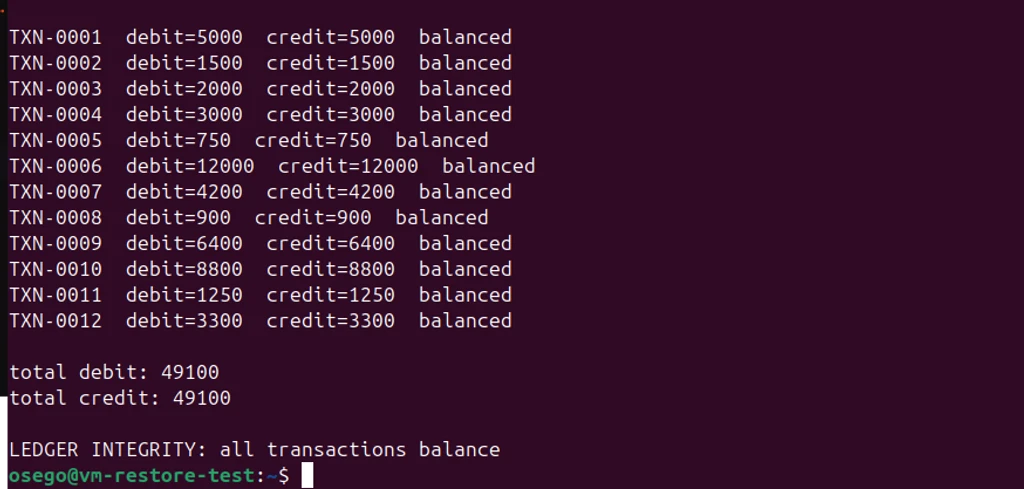
Every transaction balances. Totals match at 49,100. The invariant survived a quiesced snapshot, a disk clone, an oplog replay across two archives, and a deliberate stop point.
That is point-in-time recovery. Not "the snapshot mounted." Not "the data came back." The ledger is correct at a chosen moment, and the operation that destroyed it was excluded by decision rather than by luck.
What this layer is not
It is not a substitute for a backup product. Percona Backup for MongoDB and Ops Manager handle applyOps, gap detection, multi-shard consistency, and restore automation. This is manual by design — every layer built by hand so every decision is defensible. The trade is real: this is now code to maintain, and there is no tested restore script, which at 03:00 matters.
The oplog tooling is hand-rolled. applyOps is the trap that was found. Every future tool touching the oplog inherits the hazard.
The backup node shares a region with a voter, and the snapshots do too. A West Europe outage takes node-westeurope and node-backup together, and Standard_ZRS is zone-redundant within the region, not geo-redundant. Snapshots survive a zone; they do not survive the region. A second capture point and az snapshot copy are the answers. Neither is built.
The backup identity's key is unencrypted. An unattended agent cannot prompt, and storing the passphrase beside the key achieves nothing — so 400, root-owned, in a 700 directory is the only control. A real reduction from the member certificates, made deliberately. The mitigation is that the identity it unlocks can do exactly two things.
The drill was a deleteMany. One operation, one timestamp, an obvious stop point. A migration mangling a subset of documents, or an application writing plausible garbage for weeks, is far harder to find a stop point for and the archive-inspection technique scales badly to it. Slow-burn corruption is a different problem.
Backup is not a tool you attach to a cluster. It is a topology question that happens to be answered with tools.
The hidden node votes on nothing, serves no reads, and appears in no driver's topology map. It is the only member that can be blocked, quiesced, and read to exhaustion without anyone noticing — and that is not a consolation. It is the requirement.
Next: the drills. Kill a region and find out which of these arguments survive contact. 🔥
Comments